
Overlay GPS tracks
on your videos
Edit multiple videos with GPS maps, speed and heart-rate widgets — or turn your tracks into green-screen overlays for your next edit. Import GPX, TCX or IGC and create it all on your Mac.
Features
Everything you need to create
stunning activity videos
Edit your footage and tracks together, or export reusable green-screen elements. Two workflows, one native macOS app.
Multi-video Timeline
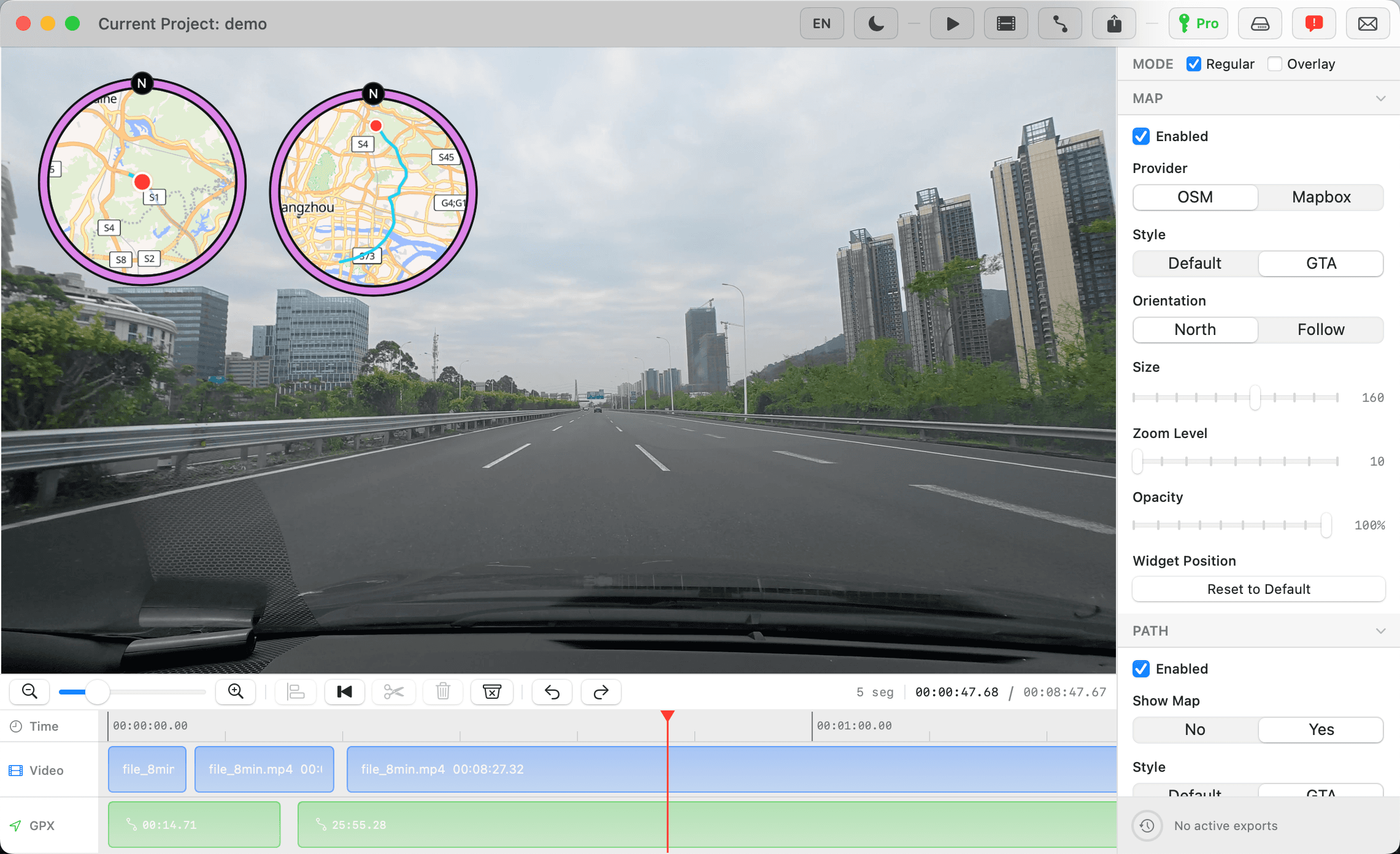
Import multiple videos and tracks. Select a clip to split, trim, move or delete it; double-click to snap it to the preceding clip. Scrub using the time ruler.
Green-screen Overlay
Turn track data into widgets on a dark-green background, ready to key in another editor. No source video needed. Export at 30 fps with no audio track.
Real-Time Map Overlay
Follow your route with OpenStreetMap or Mapbox, facing north or the direction of travel. Choose a slim Default border or a GTA ring with a north compass badge.
GPS Path Widget
Keep the full route in view with a moving position dot. Use a black or map background, Default or GTA borders, and a fixed north-up view. Size it from 100 to 200 points.
Heart Rate Graph Widget
Show a heart-rate curve with a moving cursor. It follows the tracks kept on your timeline, preserves timestamp spacing, and leaves breaks where samples are missing.
Speed Widget
Display current speed in km/h, mph or m/s. Adjust text size and opacity, then drag the widget into place.
Time Widget
Show the current track timestamp as HH:mm:ss. Adjust text size, opacity and position alongside your other widgets.
Heart Rate Widget
Display bpm when your GPX or TCX contains heart-rate samples. Add a heart icon or the minimum and maximum from the tracks kept on your timeline.
GPX, TCX & IGC Tracks
Import several track files and edit their clips independently. Start with tracks or videos in either order, while preserving breaks between separate route segments.
Resolution Presets
Regular offers Original and smaller 4K / 2K / 1080p / 720p presets where available. Overlay offers 4K / 1080p / 720p. H.264 export prefers VideoToolbox hardware encoding.
Output Size Controls
See size estimates before exporting. Adjust the bitrate factor from 0.60 to 1.00; Overlay uses its own lower bitrate budget. Actual file size depends on the content.
Async Export Queue
Queue an export and keep editing. Each job keeps its own settings, with progress and ETA shown below. Rendering continues when the app is hidden or minimized.
Stable Canvas & Layout
The first video sets the project’s aspect ratio, including portrait orientation. Resizing the window or switching modes keeps widget placement and exported proportions consistent.
Project Files
Save clips, modes, widgets and export settings in a .g2v project. The last session saves on quit and restores on launch. Keep the original media files available.
Undo & Redo
Undo and redo clip edits and widget removal with ⌘Z and ⇧⌘Z. Click a widget in the preview and press Delete to turn it off.
Multiple Map Providers
Use OpenStreetMap without a token, or connect your Mapbox token. OpenStreetMap preview and export share the same map style and rendering engine.
Bilingual Interface
Switch between English and Simplified Chinese from the toolbar without restarting the app.
Local Media Processing
Your footage and tracks are processed on your Mac. Map tiles load online and use a cache; exporting with maps can still require an internet connection.
How It Works
From GPX to video
in four simple steps
Import Your Files
Drop in MP4, MOV or M4V videos and GPX, TCX or IGC tracks. Import multiple files in either order; Overlay can start with tracks alone.
Choose Your Mode & Widgets
Use Regular to overlay your footage, or Overlay for a green-screen element video. Pick your maps, border styles, speed, time and heart-rate widgets.
Sync & Preview
Select video or track clips to split, trim and align them. Move the playhead on the time ruler and drag widgets into place in the preview.
Export
Choose a resolution and a 0.60–1.00 bitrate factor. Review the size estimate, then add the export to the queue and keep editing.
Pro Tips
Use Cases
Built for every
kind of journey
From relaxed road trips to fast trail runs — turn raw GPS data into a story your camera alone could never tell.
Road Trips
Document the drive with a live map of every turn, every detour, and every quiet stop along the way.
Motorcycle & Cycling
Pair your ride footage with speed, a moving map and heart-rate data when recorded — for motorcycling, road cycling or mountain biking.
Running & Trail
Capture trail runs, ultras, and long city loops with map overlays that follow you through mountains, forests, and coastline.
Any GPS Activity
Bring a GPX, TCX or IGC track from skiing, kayaking, paragliding or sailing. Combine it with video, or make a green-screen overlay to use later.
Technical Specifications
Built with native performance
Pricing
Simple, transparent
pricing
Start for free. Upgrade when you need full-quality export.
Free
- All editing features
- Real-time preview
- Export up to 720p
- Watermark on export
Pro Yearly
- Everything in Free
- Full resolution export
- No watermark
- All future updates
- Priority support
Pro Lifetime
- Everything in Free
- Full resolution export
- No watermark
- All future updates
- Priority support
Common Questions
Before your first export
Can I start with a track instead of a video?
Yes. Import GPX, TCX or IGC tracks first, or import MP4, MOV or M4V videos first. Regular export needs video and track data. Overlay needs only a usable track. FIT files are not directly supported.
What does Overlay export?
An H.264 MP4 with your widgets on a dark-green background, at 30 fps and without audio. Key out the green in your video editor to reuse the elements. It is not a transparent-alpha video. Pro offers 4K, 1080p and 720p; Free exports at 720p with a watermark.
Can I make portrait videos?
Yes. The first imported video sets the project’s aspect ratio and orientation for both modes. With tracks alone, the canvas starts at 16:9. Resizing the app window or switching modes keeps the widget layout consistent.
Does 0.60 mean the file will be 40% smaller?
No. The factor scales the target video bitrate budget, not the original file size. Estimates update with your resolution and factor, but the result also depends on the picture content, duration and audio. Overlay has a separate, lower bitrate budget for element videos.
Why can video export take a long time?
With MAP enabled, gpx2video updates the map’s position, orientation and route progress for each output frame, then composites and encodes the result. At 30 fps, a 25-minute video contains about 45,000 frames. This synchronized, animated map is one of the app’s core features, and rendering it takes work in both Regular and Overlay modes. Longer videos, higher frame rates and resolutions, and larger MAP widgets generally take longer to export. Your Mac’s performance also matters. Network speed mainly affects initial map loading and subsequent tile downloads; it is not the only cause of long exports. A lower export resolution or a smaller MAP widget can reduce the workload. Lowering the bitrate factor mainly reduces file size; it does not reduce the number of map frames to process.
Does local processing mean fully offline?
Editing and encoding run on your Mac. Loading map tiles can require the internet, even with caching. For a workflow without map downloads, turn off MAP and use PATH with Show Map disabled. Pro activation, license verification and update checks also use the network.
Does a .g2v project contain my videos and tracks?
No. It saves edits, source-file references, widgets, canvas and export settings. Keep your original files accessible. Projects newly saved by 1.3.0 use format v5 and need 1.3.0 or later; older project formats remain readable.
Get Started
Ready to overlay your
GPS adventures?
Start free with both editing modes and 720p watermarked export. Purchase Pro on the website and activate with your emailed license key for full-resolution, watermark-free export.
Requires macOS 14.6 (Sonoma) or later · Apple Silicon (M1 or later)